Understanding Git Internals
How does git clone really work?
This article assumes familiarity with the basics of git: commits, branches, remotes, cloning, staging and committing.
Section 1: Git Storage Model
This section recaps git’s object-based storage model. Readers already familiar with it can skip ahead.
Git stores the entire snapshot of a project on each commit. This is made possible by its object-based storage model. The relevant terms are:
- Objects: Everything Git stores is an object. Each object is uniquely identified by a SHA-1 (or SHA-256) hash and stored in the
.git/objectsdirectory. - Blob (Binary Large Object): A blob stores the contents of a single file. It does not store the filename—just the file’s content.
- Tree: A tree represents a directory. It contains pointers to blobs (files) and other trees (subdirectories), along with names and metadata like file permissions.
- Commit: A commit points to a tree and contains metadata like the author, timestamp, message, and parent commit(s). It represents a snapshot of the project at a given point in time.
On every commit, git does the following:
- Blobs are created for the contents of each file in the project.
- A tree object is created to map the directory structure and link to those blobs.
- A commit object is created pointing to the tree, along with a reference to its parent commit (if any).
- A ref (e.g.,
mainorHEAD) is updated to point to the new commit hash.
All these objects are saved under .git/objects/, compressed with zlib and named after their hash values.
This is easy to verify on a small repository. Consider one created as follows:
mkdir your-repo
cd your-repo

echo "first file" >> foo.txt
mkdir bar
echo "second file" >> bar/baz.txt

git add .
git status
git commit -m "first commit"
git log shows the hash of the resulting commit:
commit 53b1b80d093d7ad66a3f612a56e0215ad9da5952 (HEAD -> main)
Author: Udeshya Dhungana <udeshyadhungana1@gmail.com>
Date:   Mon May 19 14:34:36 2025 +0545

    first commit
The commit object inside .git/objects can be inspected with:
python -c "import zlib,sys;print(zlib.decompress(open(sys.argv[1],'rb').read()).decode())" .git/objects/53/b1b80d093d7ad66a3f612a56e0215ad9da5952
Note the slash after the first two characters of the SHA1 hash — this is how git lays out object files on disk. Object files are zlib-compressed, which is why decompression is needed to read them. The object’s name (its SHA1) is the SHA1 of all the bytes inside the commit object, headers included.
commit 203tree 377295adbf4e9f01892fd377e467549b38adc16b
author Udeshya Dhungana <udeshyadhungana1@gmail.com> 1747644576 +0545
committer Udeshya Dhungana <udeshyadhungana1@gmail.com> 1747644576 +0545

first commit
The same content, viewed through hexdump, looks like this:
00000000  63 6f 6d 6d 69 74 20 32  30 33 00 74 72 65 65 20  |commit 203.tree |
00000010  33 37 37 32 39 35 61 64  62 66 34 65 39 66 30 31  |377295adbf4e9f01|
00000020  38 39 32 66 64 33 37 37  65 34 36 37 35 34 39 62  |892fd377e467549b|
00000030  33 38 61 64 63 31 36 62  0a 61 75 74 68 6f 72 20  |38adc16b.author |
00000040  55 64 65 73 68 79 61 20  44 68 75 6e 67 61 6e 61  |Udeshya Dhungana|
00000050  20 3c 75 64 65 73 68 79  61 64 68 75 6e 67 61 6e  | <udeshyadhungan|
00000060  61 31 40 67 6d 61 69 6c  2e 63 6f 6d 3e 20 31 37  |a1@gmail.com> 17|
00000070  34 37 36 34 34 35 37 36  20 2b 30 35 34 35 0a 63  |47644576 +0545.c|
00000080  6f 6d 6d 69 74 74 65 72  20 55 64 65 73 68 79 61  |ommitter Udeshya|
00000090  20 44 68 75 6e 67 61 6e  61 20 3c 75 64 65 73 68  | Dhungana <udesh|
000000a0  79 61 64 68 75 6e 67 61  6e 61 31 40 67 6d 61 69  |yadhungana1@gmai|
000000b0  6c 2e 63 6f 6d 3e 20 31  37 34 37 36 34 34 35 37  |l.com> 174764457|
000000c0  36 20 2b 30 35 34 35 0a  0a 66 69 72 73 74 20 63  |6 +0545..first c|
000000d0  6f 6d 6d 69 74 0a 0a                              |ommit..|
000000d7
This shows that a commit object is stored like this:
commit<space><size_of_file_after_00>00<content>
The content is laid out as follows. Please note double newlines after committer line and the message line. If the commit has a parent tree, it is in between the author line and tree line.
tree<space><20_byes_of_sha1_pointing_the_tree_object>\n
author<space><author_name><space><mail_wrapped_in_angle brackets><space><time and timezone>\n
committer<space><committer name><space><mail wrapped in angles><space><time and timezone>\n\n
commit message\n\n
The SHA1 in the tree line is the hash of the tree object — a snapshot of the repo at the time of the commit.
The contents of that tree, shown by git ls-tree <sha1>, are:
040000 tree 5b927967da7802a015477771744c25136ff6df61	bar
100644 blob 303ff981c488b812b6215f7db7920dedb3b59d9a	foo.txt
So at the time of commit there was a file named foo.txt and a directory bar. Running ls-tree on the SHA1 of bar reveals its contents:
100644 blob 1c59427adc4b205a270d8f810310394962e79a8b baz.txt
The bar directory contained a single file baz.txt. The contents of those files are recoverable with git cat-file -p <sha1>:
$ git cat-file -p 303ff981c488b812b6215f7db7920dedb3b59d9a
first file
And for the second:
$ git cat-file -p 1c59427adc4b205a270d8f810310394962e79a8b
second file
The raw tree object, decompressed and dumped as hex, looks like this:
python -c "import zlib; import sys; sys.stdout.buffer.write(zlib.decompress(open(sys.argv[1], 'rb').read()))" .git/objects/37/7295adbf4e9f01892fd377e467549b38adc16b | hexdump -C
00000000  74 72 65 65 20 36 35 00  34 30 30 30 30 20 62 61  |tree 65.40000 ba|
00000010  72 00 5b 92 79 67 da 78  02 a0 15 47 77 71 74 4c  |r.[.yg.x...GwqtL|
00000020  25 13 6f f6 df 61 31 30  30 36 34 34 20 66 6f 6f  |%.o..a100644 foo|
00000030  2e 74 78 74 00 30 3f f9  81 c4 88 b8 12 b6 21 5f  |.txt.0?.......!_|
00000040  7d b7 92 0d ed b3 b5 9d  9a                       |}........|
00000049
A tree object is laid out as follows:
tree<space><size_after_null_terminator>00
<mode><space><name>00<20_bytes_sha1>
<mode><space><name>00<20_bytes_sha1>
The mode refers to the permissions of the file/directory. Git does not store all of the UNIX permissions. The full set of modes git uses is:
| Mode | Type | Description |
|---|---|---|
100644 | blob | Normal file (non-executable) |
100755 | blob | Executable file |
120000 | blob | Symbolic link |
160000 | commit | Git submodule (pointer to a commit) |
40000 | tree | Directory |
The blob files have the same general shape:
python -c "import zlib; import sys; sys.stdout.buffer.write(zlib.decompress(open(sys.argv[1], 'rb').read()))" .git/objects/30/3ff981c488b812b6215f7db7920dedb3b59d9a | hexdump -C
python -c "import zlib; import sys; sys.stdout.buffer.write(zlib.decompress(open(sys.argv[1], 'rb').read()))" .git/objects/1c/59427adc4b205a270d8f810310394962e79a8b | hexdump -C
Their decompressed contents are:
First File
00000000  62 6c 6f 62 20 31 31 00  66 69 72 73 74 20 66 69  |blob 11.first fi|
00000010  6c 65 0a                                          |le.|
00000013
Second File
00000000  62 6c 6f 62 20 31 32 00  73 65 63 6f 6e 64 20 66  |blob 12.second f|
00000010  69 6c 65 0a                                       |ile.|
00000014
So a blob object is structured as:
blob<space><size_after_null_terminator>00<content>
In summary, every commit produces a commit object that holds the SHA1 of a tree. That tree contains the SHA1s of the files and directories at the root of the project. Following these hashes recursively reaches every sub-directory and file that existed at the time of the commit.
That covers git’s object-based storage model.
Section 2: Git Clone
Git clone is performed by a git client making a request to a git server (e.g. GitHub, GitLab, or a self-hosted git server). Git communicates with the server over either SSH or HTTP(S). The HTTP(S) variant is referred to as Smart HTTP(S) because of the special request/response syntax it uses.
Git clone takes place in two steps.
Ref Discovery

- The client asks the server what refs are available.
- The server sends a list of refs that are available and a list of capabilities.
Refs are just human-readable pointers to commits. Capabilities are features that the git server supports. For example, side-band means that on the next request (described below), the server will also send progress information alongside pack files. The full list of capabilities is documented at https://git-scm.com/docs/protocol-capabilities.
The snippets in this section come from a Go implementation of git built for Codecrafters’ Build Your Own Git challenge. The full source is available here.
The ref-discovery request looks like this:
/* ...... code ...... */
func GetGitUploadPack(repoURL string) (*http.Response, error) {
    serviceURL := fmt.Sprintf("%s/info/refs?service=git-upload-pack", repoURL)
    return http.Get(serviceURL)
}
/* ...... code ...... */
The response is structured as follows:
001e# service=git-upload-pack
0000
015547b37f1a82bfe85f6d8df52b6258b75e4343b7fd HEADmulti_ack thin-pack side-band side-band-64k ofs-delta shallow deepen-since deepen-not deepen-relative no-progress include-tag multi_ack_detailed allow-tip-sha1-in-want allow-reachable-sha1-in-want no-done symref=HEAD:refs/heads/master filter object-format=sha1 agent=git/github-203a3d8c358f
003f47b37f1a82bfe85f6d8df52b6258b75e4343b7fd refs/heads/master
0000
Git PKT Line Format
Git uses PKT line encoding for these messages. Each line begins with 4 hex digits indicating the size of the line, including the prefix itself and the trailing newline. A special flush line consists of just 0000.
For example, the line starting with 0155:
015547b37f1a82bfe85f6d8df52b6258b75e4343b7fd HEADmulti_ack thin-pack side-band side-band-64k ofs-delta shallow deepen-since deepen-not deepen-relative no-progress include-tag multi_ack_detailed allow-tip-sha1-in-want allow-reachable-sha1-in-want no-done symref=HEAD:refs/heads/master filter object-format=sha1 agent=git/github-203a3d8c358f
The 0155 prefix indicates that the line is 341 (0x155) bytes long.
Lines starting with # are comments and can be ignored. However, the git protocol specifies that the server must respond with # service=git-upload-pack on the first line.
Non-comment, non-flush lines are structured as:
<4 bytes for size><20 bytes for shasum><space><ref_name>\n
Lines that carry tag information are not covered here.
Only the first such line contains capabilities, and is structured as:
<4 bytes for size><20 bytes for shasum><space><ref_name>00<capabilities separated by space>\n
The client takes the shasum of HEAD from this response and uses it to build the upload-pack request. The request can ask for more than one commit, but a single one is enough to illustrate the rest.
Upload Pack POST
func PostGitUploadPack(repoURL, want string) (*http.Response, error) {
    var body bytes.Buffer

    body.Write(pktLine(fmt.Sprintf("want %s\n", want)))
    body.Write(flushPkt())
    body.Write(pktLine("done\n"))

    req, err := http.NewRequest("POST", repoURL+"/git-upload-pack", &body)
    if err != nil {
        return nil, err
    }
    req.Header.Set("Content-Type", "application/x-git-upload-pack-request")
    req.Header.Set("Accept", "application/x-git-upload-pack-result")

    return http.DefaultClient.Do(req)
}
Here, want is the sha1sum of HEAD taken from the previous response. This minimal request asks for no capabilities — just enough for a bare-minimum clone.
The response to this request is a git packfile. Its overall structure is:
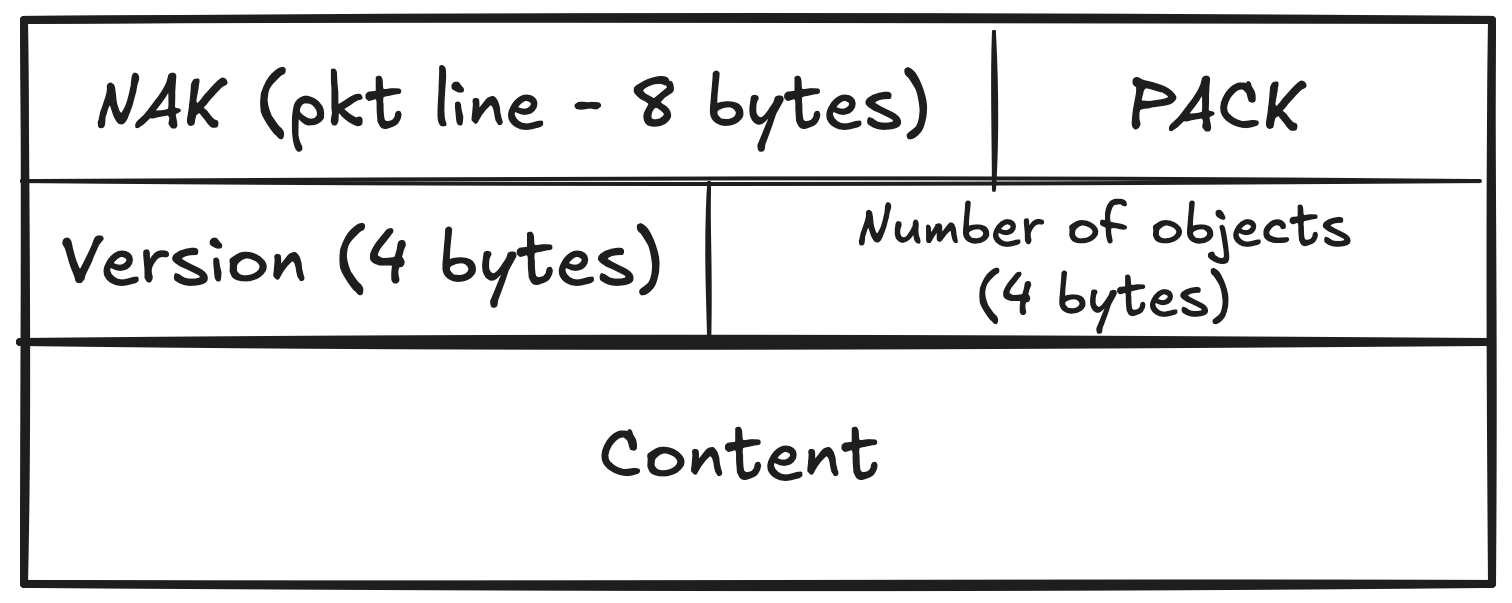
A packfile starts with a pkt-line encoded “NAK” literal, followed by a literal “PACK” literal.
Packfile Header
The next 4 bytes hold the version, and the 4 bytes after that hold the number of objects in the body that follows.
The version and the number-of-objects field are stored in big-endian format. As an example, the bytes 00 00 00 02 for the version field and 00 00 01 4c for the object-count field decode like this.
In big-endian format, the most significant byte comes first. So,
Bytes (hex):      00    00    00    02
Position:         MSB               LSB
This means that the version is 2.
Bytes (hex):      00    00    01    4c
Position:         MSB               LSB
This equates to 332 (0x0000014c) in decimal.
So the body that follows contains 332 unique objects.
Packfile Body
The packfile body is organized as follows.
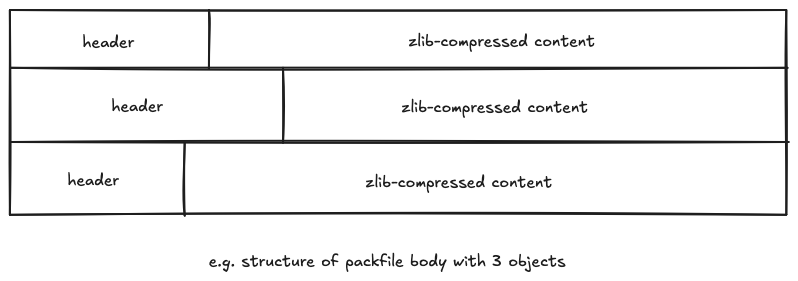
The illustration above shows that for each object, there will be a header section, and a zlib-compressed body section that will contain the object’s contents.
Object Header
The header section specifies two key things: object type, and the size of the object after decompression. The size is indicated so that the git client can allocate the memory for the decompressed object.
The object type may be any one of the following:
- COMMIT = 1 (001)
- TREE = 2 (010)
- BLOB = 3 (011)
- TAG = 4 (100)
- OFS_DELTA = 6 (110)
- REF_DELTA = 7 (111)
The OFS_DELTA and REF_DELTA types are explained later in this section.
The object type and size are encoded in the header bits as follows.
In the first byte of the header (with bit 0 as the LSB), bits 4-6 encode the object type, and the lower 4 bits hold the first piece of the size:
/* bits 4-6 of b hold the object type */
objTypeCode := (b >> 4) & 0x7

/* bits 0-3 of b hold the lowest 4 bits of the size */
objectSize := int(b & 0x0F)
The size is variable-length. The MSB of each byte is a continuation bit: 1 means another byte follows, 0 means the size is complete. Each subsequent byte contributes its lower 7 bits to the size, shifted into place above the bits already accumulated — 4 bits from the first byte, then 7 bits from each following byte.
objectSize = ....... | ....... | ....... | ....
              byte3     byte2     byte1    byte0
So the first 4 bits of objectSize come from the first byte’s bits 0-3, the next 7 from byte1 & 0x7F, the next 7 from byte2 & 0x7F, and so on.
If the object type is REF_DELTA, the next 20 bytes after the size are the SHA1 of the base object it references. (REF_DELTA itself is described below.)
Note: this 20-byte SHA1 sits between the header and the zlib-compressed body, not inside it — easy to miss when implementing the parser.
Object Body
The object body is a zlib-compressed chunk of data.
For blob, tree, and commit objects, the decompressed body inside a packfile differs slightly from the corresponding file in .git/objects: the packfile body contains only the content that would appear after the null terminator in an on-disk git object.
For example, a blob in a packfile is not stored as
blob<space><size_after_null_terminator>00<content>
but only as
<content>
The same is true for tree and commit objects.
With this, every non-delta object in the packfile is parseable. Only the RefDeltas remain.
RefDelta
A delta is a small change. A RefDelta is an object that contains a set of instructions for producing a new object from an existing one.
Why RefDeltas, instead of sending the full object?
RefDeltas are an efficient way to ship related objects. Instead of sending two near-identical blobs, the server sends the first one in full and a RefDelta that records only the change between the two — for example, the 10 new lines appended to a 1000-line file from the previous commit.
The 20-byte SHA1 in the object header (mentioned earlier) is the SHA1 of the base object that the RefDelta references.
Before describing how a RefDelta is applied, it helps to understand its structure.
Structure of a RefDelta
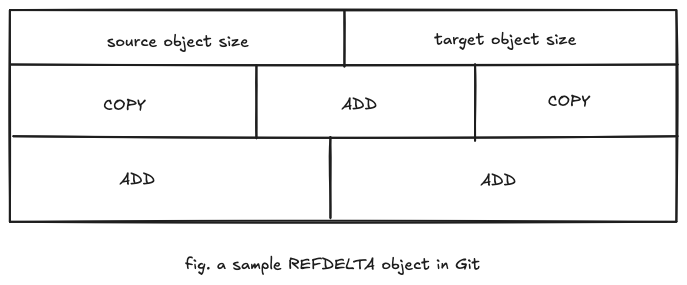
A RefDelta starts with the source object size (the size of the base object it references), followed by the target object size (the size of the resulting object after the delta has been applied). After the two sizes comes a series of COPY and ADD instructions. The size encoding is described first.
Source object size encoding
The encoding is the same variable-length scheme as in the packfile object header, with one difference: every byte contributes 7 bits (rather than 4 from the first byte and 7 from the rest). The MSB of each byte is the continuation bit, and reading stops at the first byte whose MSB is 0. This format is called LEB128.
For example, the bytes (in hex):
0xE5 0x8E 0x26
Binary:
0xE5 = 11100101 → continuation bit set (more to read), value bits: 1100101 = 0x65
0x8E = 10001110 → continuation bit set, value bits: 0001110 = 0x0E
0x26 = 00100110 → last byte, value bits: 0100110 = 0x26
Decoding:
result = 0
result |= 0x65 << 0
result |= 0x0E << 7
result |= 0x26 << 14

Total =  100197
Target object size encoding
Identical to the source size encoding.
Instruction encoding
A RefDelta uses two kinds of instructions: COPY and ADD.
- COPY: Copy
nbytes from the given offset within the base object. - ADD: Insert literal bytes into the new object.
Each instruction begins with a single byte. Its MSB selects the kind: 1 for COPY, 0 for ADD.
ADD
The simpler of the two. Bits 0-6 of the instruction byte hold the size of the literal data in bytes; that many bytes of literal data follow immediately. A single ADD instruction can therefore carry at most 127 bytes (0x7F). For longer literals, git emits consecutive ADD instructions.
COPY
For COPY, the data size n and the offset are extracted as follows.
In the instruction byte:
- Bits 6-4: describe how the data size
nis laid out in the bytes that follow. - Bits 3-0: describe how the offset is laid out.
The offset is read first, then the size. An example clarifies this.
Suppose the control byte b is:
b = 11101101

This breaks down as:

bit 0 = 1 → read next byte (for offset) → used as bits 0–7 of offset
bit 1 = 0 → skip                        → if read, would have been bits 8–15 of offset
bit 2 = 1 → read next byte (for offset) → used as bits 16–23 of offset
bit 3 = 1 → read next byte (for offset) → used as bits 24–31 of offset

bit 4 = 0 → skip
bit 5 = 1 → read next byte (for size) → used as bits 8–15 of size
bit 6 = 1 → read next byte (for size) → used as bits 16–23 of size
The offset is built by iterating over the four LSB bits of the control byte. For each bit set to 1, the next byte from the stream is read, shifted left by 8 * i (where i is the bit’s position from the right), and OR’d into the offset. Bits set to 0 contribute nothing.
The size is built the same way using bits 4-6 of the control byte. For each set bit, the next byte is read, shifted left by (i - 4) * 8, and OR’d into the size.
These rules are enough to fully parse a RefDelta object.
Applying RefDelta
Computing the SHA1 of every decompressed object straight from the packfile body produces hashes that match none of the SHAs referenced by the RefDeltas.
The reason: a SHA1 in git is computed over the full on-disk object form, including its header. So before hashing, each non-delta object must be prepended with the appropriate header. For example, a blob becomes:
blob <size>00<content>
just as it would appear in a git object file. Hashing the headered form makes at least one object’s SHA1 match the SHA referenced by some RefDelta.
A RefDelta is applied to its base object as follows.
Given a base file (the referenced git object):
Base file:
"Hello, my name is Alice.\n"
And a RefDelta containing these instructions (the right side of each arrow shows what the instruction evaluates to):
COPY offset=0, size=18 → "Hello, my name is A"

ADD 3 bytes: "Bob" → replace "Alice" with "Bob"

COPY offset=23, size=1 → copy the "\n"

ADD 21 bytes: "Nice to meet you!\n"
Applied to the base file, the result is:
"Hello, my name is ABob\nNice to meet you!\n"
Applying every delta
Git keeps the delta objects in a queue. It dequeues each one, applies it to its referenced base object to produce a new object, and adds the new object to its set of resolved objects. The process repeats until the queue is empty.
Once every delta has been resolved, git initialises the .git directory and writes every object into .git/objects.
Populating the cloned directory
Starting from the SHA1 of HEAD, git walks to the commit’s root tree. From there, it recursively creates every file and directory described by that tree, restoring the project to the state at the time of the commit.